
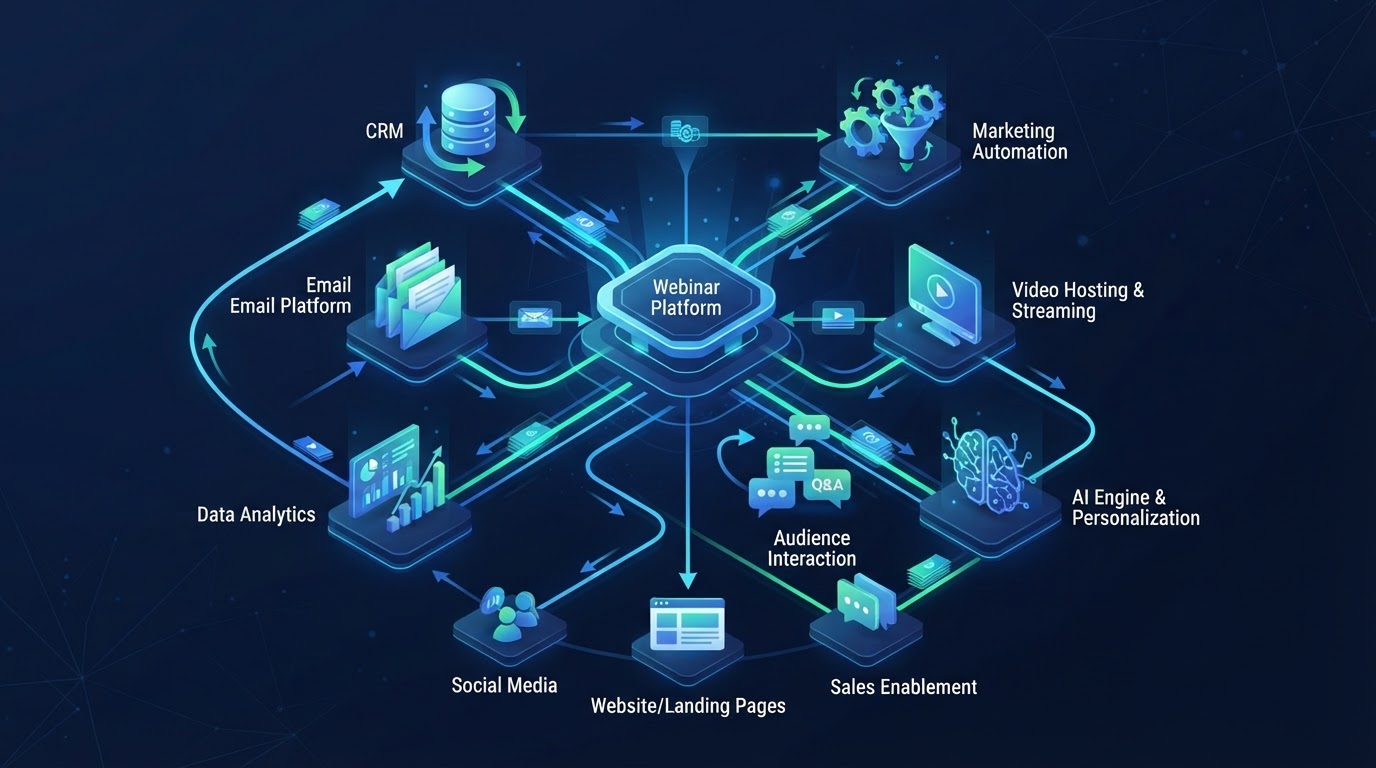
The typical webinar technology stack is a mess. A landing page builder for the registration page. A separate webinar platform for the presentation. An email tool for reminders. A CRM for lead tracking. A calendar tool for booking. A video host for the replay. An analytics tool for tracking. And Zapier connecting them all — badly, intermittently, and with enough latency to lose leads.
This stack works, technically. Each tool does its job. But the integration points are where leads are lost, data is inconsistent, and the team spends time maintaining connections instead of optimizing the funnel. The more tools in the stack, the more failure points. The more failure points, the more leaks.
What you actually need
A webinar technology stack needs to do six things: create the presentation, host the registration page, run the webinar, engage attendees, follow up, and track results. The question is whether you need six tools to do these six things — or one platform that does all six.
Presentation creation
You need a way to create the webinar — script, slides, and presenter. Traditionally, this meant a slide tool (PowerPoint, Google Slides), a script document, and a recording setup. With AI-assisted creation, this can be a single platform that generates the script, builds the slides, and produces the presenter — eliminating three separate tools.
Registration page
You need a registration page that converts visitors to registrants. This can be a landing page builder (Unbounce, Leadpages) or a built-in page from the webinar platform. The built-in option is simpler and eliminates an integration point. The standalone builder offers more design flexibility but adds a tool to manage.
Webinar hosting
You need a platform to host the webinar — run the presentation, manage attendees, handle the chat. This is the core of the stack. The platform should support the formats you need (live, evergreen, just-in-time) and the engagement features you want (AI Q&A, polls, offers).
Engagement
You need a way to engage attendees during the webinar — chat, polls, handouts, offers. For automated webinars, AI Q&A is the engagement feature that matters most. If the webinar platform includes these features, you do not need a separate engagement tool. If it does not, you are limited to passive viewing.
Follow-up
You need a way to follow up with attendees after the webinar — email and SMS sequences, segmented by behavior. This can be an email marketing tool (ActiveCampaign, ConvertKit) integrated with the webinar platform, or a built-in follow-up system. The built-in option ensures behavioral data flows directly to the follow-up without integration latency.
Analytics
You need a way to track results — registration, attendance, engagement, offer clicks, and conversion. This can be the webinar platform's built-in analytics, a separate analytics tool (Google Analytics), or both. The built-in analytics are more useful for webinar-specific metrics (watch time, drop-off, questions). The separate tool is more useful for cross-channel tracking.
The ideal webinar technology stack is one platform that does all six things — creation, registration, hosting, engagement, follow-up, and analytics. Every additional tool adds an integration point, and every integration point is a place where leads are lost, data is inconsistent, and the team spends time maintaining connections instead of optimizing the funnel.
What you do not need
- A separate slide tool if the webinar platform generates slides from the script.
- A separate landing page builder if the platform includes registration pages.
- A separate video host if the platform hosts replays.
- A separate chat tool if the platform includes AI Q&A.
- A separate follow-up tool if the platform includes behavioral email sequences.
- Zapier connections between any of the above — if the platform is integrated, the connections are native and reliable.
Each of these is a tool that a business adds because their core webinar platform does not include the feature. But each addition creates an integration point, and each integration point creates a failure point. The stack grows. The maintenance grows. The reliability decreases.
The integration tax
Every integration in your stack has a cost. The obvious cost is the subscription fee for each tool. The less obvious cost is the integration tax: the time spent setting up and maintaining connections, the data inconsistencies when tools sync imperfectly, the latency between an attendee's action and the follow-up it triggers, and the leads lost when an integration fails silently.
A stack of six tools connected by Zapier has at least five integration points. Each can fail. Each adds latency. Each creates a place where data is transformed, potentially incorrectly. The integrated platform has zero integration points for these functions — because they are all in one system. The data flows natively. The follow-up triggers immediately. The analytics are consistent.
The CRM question
The one tool that usually remains separate is the CRM. Even with an integrated webinar platform, most businesses need their webinar data in their CRM — so sales teams can see attendee behavior and follow up within their existing workflow. The CRM integration is the one that matters most, and it should be native, not Zapier-based.
When evaluating a webinar platform, check whether it integrates natively with your CRM. If it does, attendee data — registration, attendance, engagement, offer clicks — flows into the CRM automatically, in real time. If it does not, you will need Zapier, and you will accept the integration tax: latency, data inconsistency, and occasional silent failures.
See AI webinars in action
Watch how WebinarBoostAi creates, presents, and engages with webinars using AI.
Book A DemoFrequently Asked Questions
What is a webinar technology stack?
A webinar technology stack is the set of tools used to create, host, and manage webinars. It typically includes a presentation creation tool, registration page builder, webinar hosting platform, engagement tools, follow-up/ email system, and analytics. The ideal stack is one integrated platform that does all six — minimizing integration points and failure points.
What tools do I need for webinars?
You need tools for six functions: presentation creation (script, slides, presenter), registration page, webinar hosting, attendee engagement, follow-up (email/SMS), and analytics. Whether you need six separate tools or one integrated platform depends on whether your webinar platform includes all six functions natively.
Do I need Zapier for webinars?
Only if your webinar platform does not integrate natively with your other tools. Zapier adds an integration tax: latency between attendee actions and follow-up, data inconsistencies when tools sync imperfectly, and leads lost when integrations fail silently. Native integrations are more reliable and faster.
How do I integrate webinars with my CRM?
Look for a webinar platform that integrates natively with your CRM — not through Zapier. Native integration means attendee data (registration, attendance, engagement, offer clicks) flows into the CRM automatically in real time. This is the most important integration in the stack, and it should be native.
Can one platform handle the entire webinar stack?
Yes. An integrated AI webinar platform can handle presentation creation (AI-generated scripts, slides, and presenters), registration pages, webinar hosting (live, evergreen, just-in-time), engagement (AI Q&A, polls, offers), behavioral follow-up, and analytics — all in one system. This eliminates integration points and the failure and latency they introduce.