
The single biggest weakness of automated webinars has always been the chat. An attendee watches a presentation, has a question, types it in, and gets nothing. No response. No acknowledgment. The presentation keeps playing. Within thirty seconds, the attendee knows they are watching a recording, not attending an event. The trust the webinar was building evaporates.
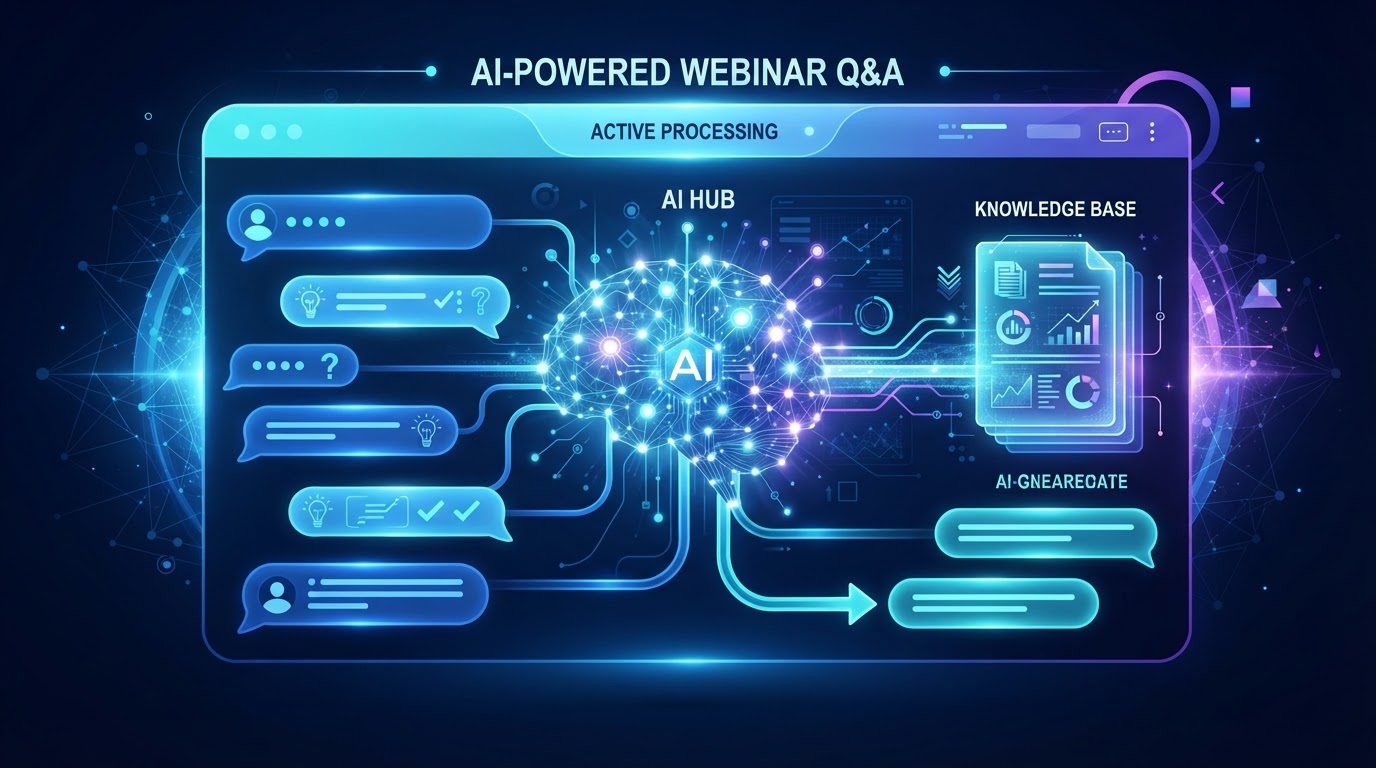
AI Q&A addresses this directly. When an attendee asks a question during an automated webinar, the AI reads it, searches an approved knowledge base, and responds in real time. The attendee gets an answer. The experience becomes interactive. The webinar feels attended, not abandoned.
How AI webinar Q&A works
The system has three components. First, the knowledge base — a collection of approved information you provide: product details, pricing, FAQs, policies, educational content, and common objections. Second, the AI engine — which reads each attendee question, finds the relevant information in the knowledge base, and generates a response. Third, the guardrails — rules that determine what the AI will answer, what it will escalate, and how it communicates limitations.
When an attendee types a question, the AI matches it against the knowledge base. If it finds a confident match, it responds with an answer drawn from your approved content. If the question is outside the knowledge base — or requires individualized judgment — the AI does not guess. It acknowledges the question and directs the attendee to the appropriate next step: a consultation, a follow-up email, or a human review.
What AI Q&A can answer
- General product questions — what it does, how it works, what is included
- Pricing questions — plan details, what is covered, billing frequency
- Common objections — how it compares to alternatives, what makes it different
- Educational questions — concepts, terminology, and explanations related to the webinar topic
- Logistical questions — next steps, how to book, what happens after the webinar
These are the questions that a well-prepared salesperson or support agent would answer the same way every time. They are predictable, repeatable, and do not require understanding the specific person's situation. That is exactly what AI handles well.
What AI Q&A cannot answer
The AI cannot provide individualized professional advice. A law firm's AI cannot evaluate a specific legal claim. A medical practice's AI cannot diagnose a symptom. A financial advisor's AI cannot recommend a specific investment. These questions require understanding the individual's circumstances — and that is the line the AI must not cross.
The guardrail is simple: if the question requires professional judgment about a specific person's situation, the AI does not attempt to answer. Instead, it explains that the question depends on individual circumstances and directs the attendee to a consultation or appropriate professional. This is not a limitation of the technology. It is a design decision that keeps the AI in its lane — education and navigation, not advice.
The AI handles the questions that are the same every time. The humans handle the questions that are different every time. That division is what makes AI Q&A safe, useful, and scalable.
Why this changes automated webinars
Before AI Q&A, an automated webinar had a structural ceiling. The presentation could be excellent. The registration page could convert. The follow-up could be sophisticated. But the live chat experience was broken — and that broken experience capped the trust the webinar could build. Attendees who felt ignored did not convert, no matter how good the slides were.
AI Q&A removes that ceiling. The attendee asks a question and gets an answer. The question might be about pricing, about a feature, about how the service compares to an alternative. The AI responds using your approved content. The attendee feels heard. The trust holds. The webinar converts the way a live session would — but at the scale of an automated one.
This is the shift that makes automated webinars viable for businesses that previously could not justify them. The presentation scales without your time. The engagement scales without your presence. Automated does not have to mean unattended.
Building the knowledge base
The quality of the AI's answers depends entirely on the quality of the knowledge base. If you upload thin, vague, or outdated content, the AI will give thin, vague, or outdated answers. The knowledge base is not a set-and-forget document. It should include your current pricing, your current feature list, your current FAQs, and the objections your sales team hears most often.
The best knowledge bases are built from real customer interactions. Review the questions your sales team receives. Review the emails your support team answers. Review the objections that come up in sales calls. Those are the questions the AI needs to handle — and the answers the knowledge base needs to contain. Build it from reality, not from what you think attendees might ask.
See AI webinars in action
Watch how WebinarBoostAi creates, presents, and engages with webinars using AI.
Book A DemoFrequently Asked Questions
What is AI webinar Q&A?
AI webinar Q&A answers attendee questions in real time during an automated webinar. The AI reads each question, searches an approved knowledge base you provide, and responds with relevant information. Questions outside the knowledge base are escalated to a follow-up or consultation.
Can AI answer questions during a webinar?
Yes. AI can answer general product questions, pricing questions, common objections, and educational questions using your approved content. It cannot provide individualized professional advice — legal, medical, or financial — and instead directs those questions to a human consultation.
How does AI webinar chat work?
The system has three parts: a knowledge base of your approved information, an AI engine that matches questions to that content, and guardrails that determine what the AI answers versus escalates. The AI responds to questions it can answer confidently and routes the rest to a next step.
What should I put in the AI knowledge base?
Include current pricing, feature lists, FAQs, common objections, educational content, and logistical information like next steps and booking processes. Build it from real customer questions your sales and support teams receive, not from guesses about what attendees might ask.
Can AI Q&A replace a human in webinar chat?
For predictable, repeatable questions — yes. For questions requiring individualized judgment — no. The AI handles the questions that are the same every time. Humans handle the questions that are different every time. That division is what makes it safe and scalable.